
Why Choose Laravel Form Builder?
Every project needs forms — from contact forms to surveys and lead capture. But building them from scratch in every project is repetitive and time-consuming. Developers often spend hours writing HTML, validation rules, and submission logic again and again.
Our open-source Laravel form builder package eliminates that pain. It gives you:
- A drag-and-drop builder, fully open source – Visually build forms inside your Laravel project with complete code access and no vendor lock-in
- Laravel-powered validation with spam protection – Secure your forms using built-in rules, honeypot, reCAPTCHA, and hCaptcha
- A self-hosted submission system – Collect, store, and manage responses inside your own app — no external SaaS needed
It’s the fastest, most developer-friendly way to build dynamic forms in Laravel — free, flexible, and completely yours.
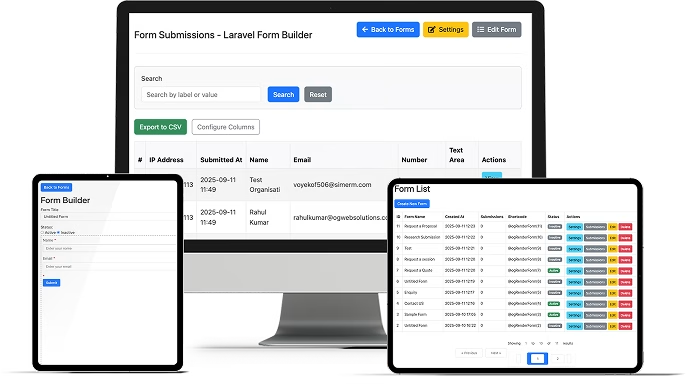
Features


100% Open Source
Free forever, fully self-hosted, and backed by the Laravel community

Drag-and-Drop Builder
Create forms visually in seconds

Validation & Spam Protection
Laravel rules, honeypot, reCAPTCHA & hCaptcha support

Submission Management
Save to DB, send emails, trigger webhooks

Easy Embedding
Add forms to Blade views or embed via JS widget

Extensible Architecture
Create your own field types, rules, or themes

Analytics Ready
Track UTM tags and metadata with submissions

CSV Export & Integrations
Export data or connect to external apps

Team-Friendly
Works seamlessly across projects and client sites
Who It’s For

Laravel Developers
Build forms quickly, reuse them, and focus on features

Agencies & Studio
Deliver faster and manage multiple client forms with ease

SaaS Teams & Startups
Add dynamic, self-hosted forms directly into product

Marketing Teams
Launch lead capture forms without waiting on devs

Open Source Enthusiasts
Full control, no vendor lock-in, completely free

Freelancers
Deliver projects faster and impress clients with polished forms
Installation & Setup Guide
Getting started with Laravel Form Builder is beginner-friendly. Follow these steps and you’ll have your first form live in minutes.
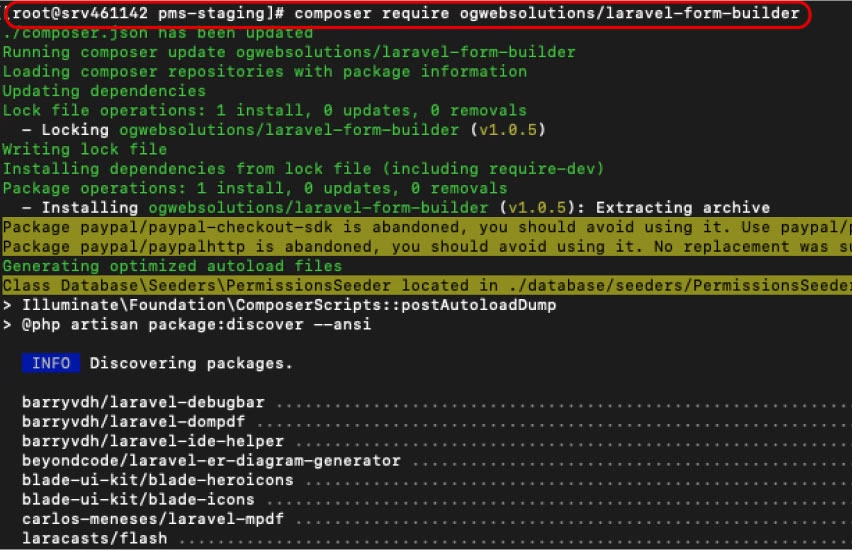
Step 1: Install the Package
In your Laravel project folder, run:
composer require ogwebsolutions/laravel-form-builder
This installs the package into your project.
Tip for beginners: If Composer isn’t installed, download it from getcomposer.org.
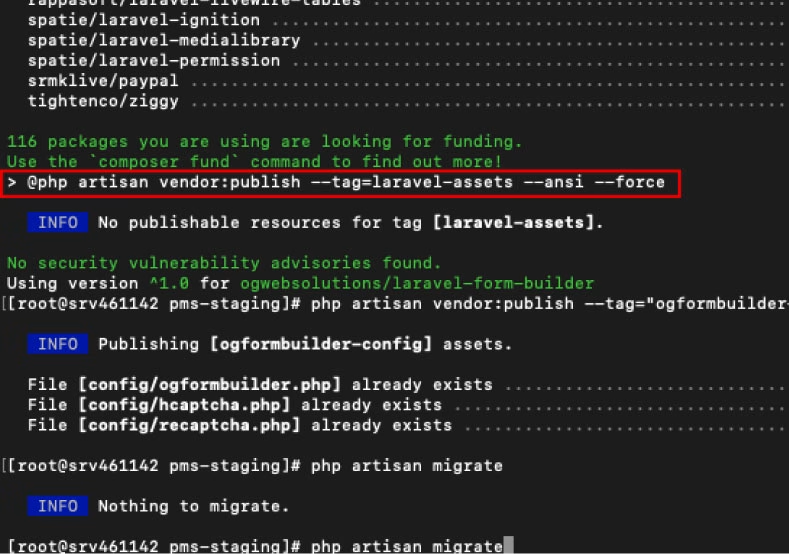
Step 2: Publish Configuration Files
Run:
php artisan vendor:publish --tag="ogformbuilder-config"
This creates config files inside /config:
ogformbuilder.php(main settings)recaptcha.php(Google reCAPTCHA)hcaptcha.php(hCaptcha)
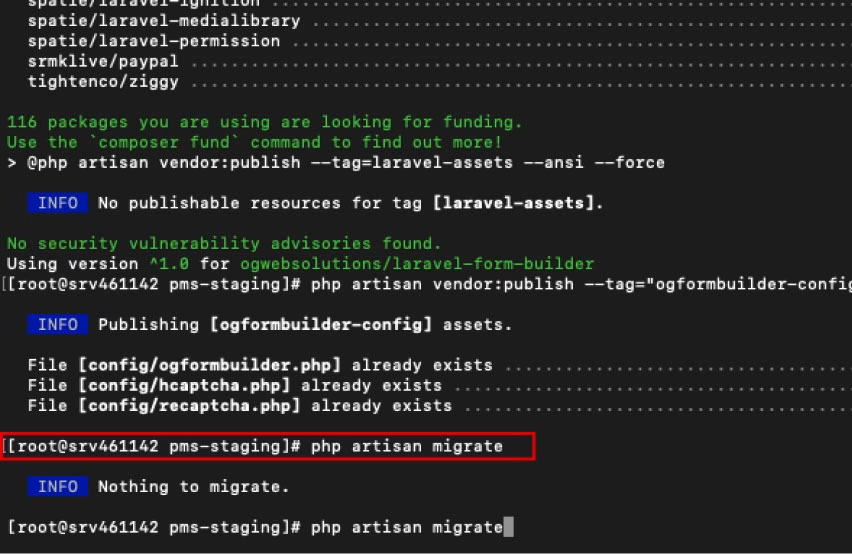
Step 3: Run Database Migrations
Create the database tables required for forms and submissions:
php artisan migrate
This sets up:
formstable – stores form structureform_fieldstable – stores individual fieldsform_submissionstable – stores responses
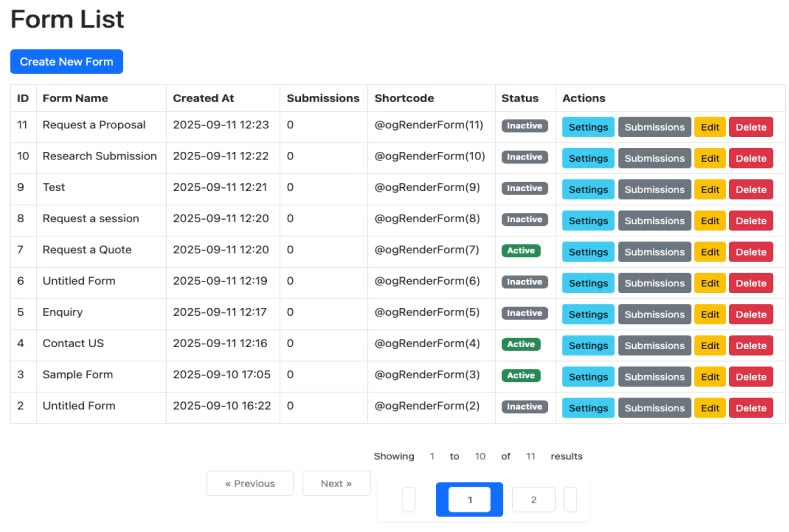
Step 4: Access the Form Builder
Login to your Laravel app. In your sidebar/dashboard, you’ll now see Form Builder.
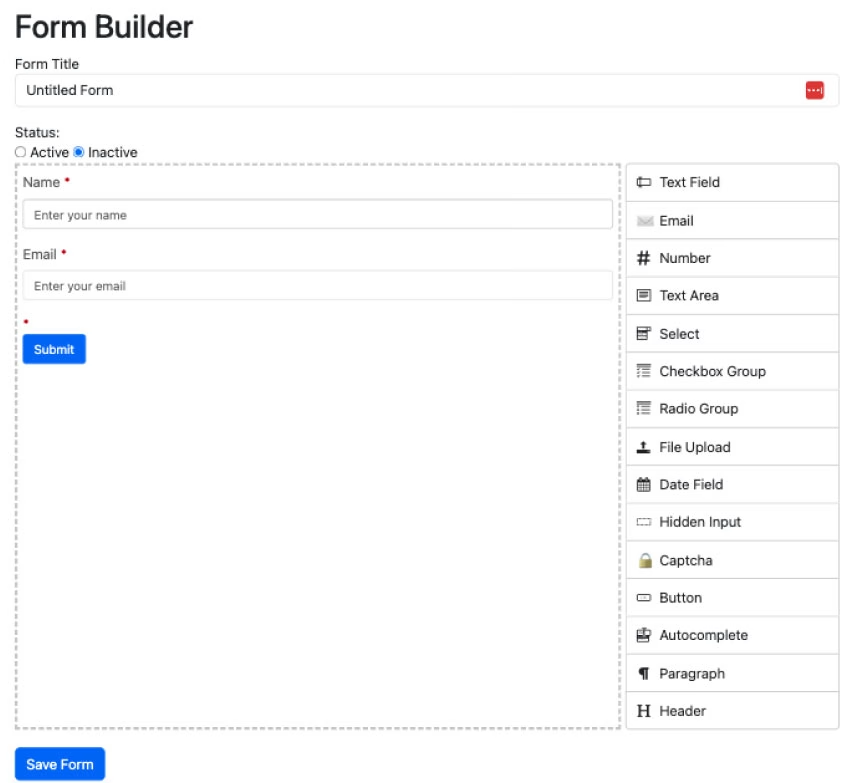
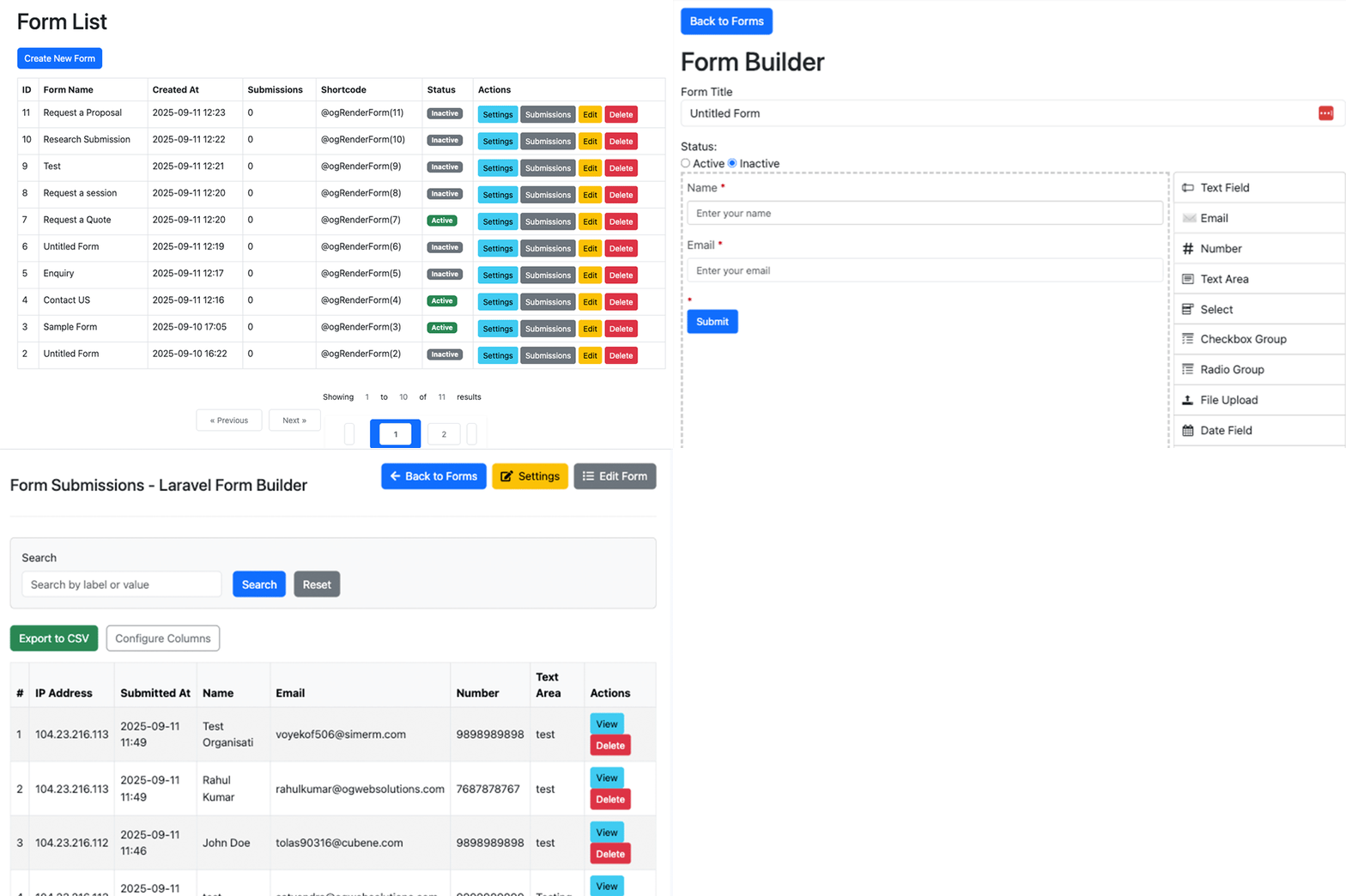
Step 5: Create Your First Form (Drag-and-Drop)
- Open Form Builder
- Drag fields like Text, Email, Select, File Upload onto the canvas
- Customize labels, placeholders, and validation rules
- Enable CAPTCHA if needed
- Save the form
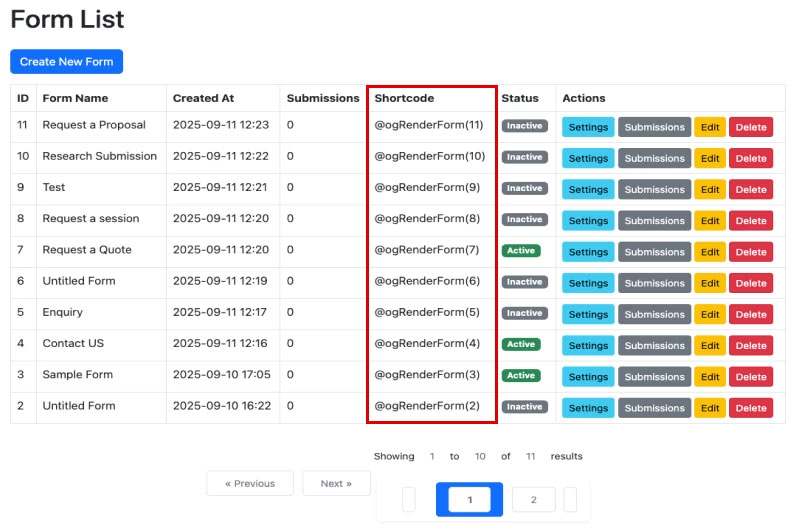
Step 6: Embed Your Form in a Page
Every form has a unique slug. Add it to any Blade template:
<x-ogws-form::embed slug="contact-us" />
Reload your page — your form is live!
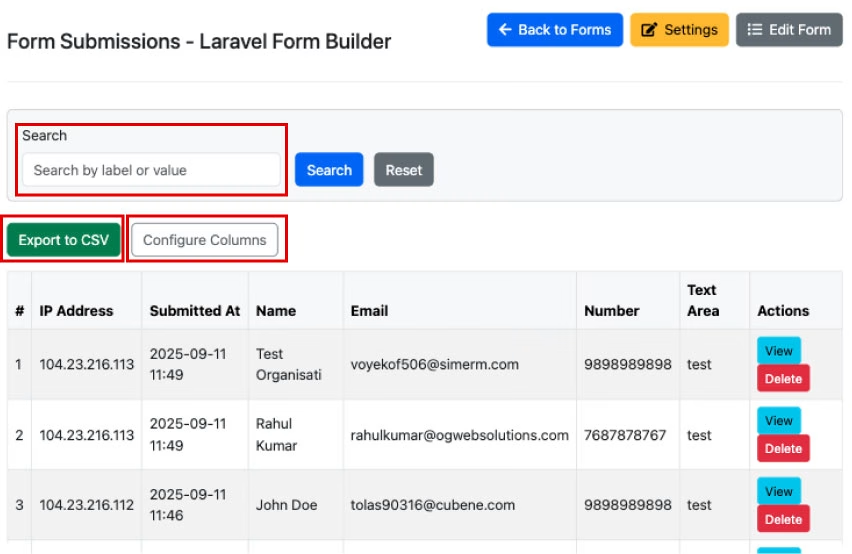
Step 7: Collect & Manage Submissions
All submissions appear in the Submissions Dashboard. You can:
- View entries with search & pagination
- Export to CSV for reports
- Trigger email or webhook notifications
- Reduce spam with reCAPTCHA/hCaptcha

Done!
Your Laravel Form Builder is now live and ready to use.
- Build unlimited forms visually
- Apply Laravel’s powerful validation
- Manage data effortlessly across projects
The Difference It Makes
Old way
- ❌ Manual coding for every form
- ❌ Slow delivery
- ❌ No reusability
- ❌ Complex maintenance
With Laravel Form Builder
- ✅ No repetitive coding for every form
- ✅ Faster delivery and client satisfaction
- ✅ Built-in security and spam protection
- ✅ Self-hosted and customizable to fit any project
Get Started Today
Laravel Form Builder is open source, free, and ready for your next project. Download it now and start building better forms in minutes. Need help or customization? Our team at OG Web Solutions has you covered.
Coming Soon

Quick video setup guide

Pre-built form templates & themes

Advanced integrations (Slack, Zapier, Google Sheets)
Frequently Asked Questions
What is Laravel Form Builder?
Laravel Form Builder is an open-source package that lets you create forms in Laravel using a drag-and-drop interface instead of writing repetitive code. It includes built-in validation, spam protection, submission storage, and easy embedding in Blade templates. Developers can build contact forms, surveys, and lead capture forms in minutes.
How do I install Laravel Form Builder in my project?
To install Laravel Form Builder:
- Run
composer require ogwebsolutions/laravel-form-builder - Publish config files:
php artisan vendor:publish --tag="ogformbuilder-config" - Run migrations:
php artisan migrate - Log in to your app and access Form Builder from the dashboard.This process sets up the package with ready-to-use database tables, configuration, and builder UI.
- Run
Does Laravel Form Builder support file uploads and checkboxes?
Yes. Laravel Form Builder includes support for file uploads, checkbox groups, radio buttons, and other advanced input types. You can drag and drop these fields into your form, set validation rules, and process uploaded files securely.
How do I embed a form created with Laravel Form Builder?
After creating a form, copy its unique slug and embed it in any Blade template using:
When you refresh the page, the form will appear fully functional and connected to your submission database.
Can I use Laravel Form Builder with Laravel 10 and 11?
Yes. Laravel Form Builder is fully compatible with Laravel 9, Laravel 10, and Laravel 11. It requires PHP 8.1 or higher. The package is designed to work seamlessly with the latest Laravel versions, making it future-ready.
Is Laravel Form Builder free and open source?
Absolutely. Laravel Form Builder is 100% free and open source, available on GitHub under the MIT license. You can download, modify, and use it in personal or commercial projects without restrictions. For advanced needs, our team also provides customization and support.
